
Download Protein Tracker – protein tracker, protein intake, fitness tracker, health app, muscle building, daily protein goal, food log, meal cards, offline app, weight tracker, fitness goals, protein calculator, healthy eating
Overview
Protein Tracker is a lifestyle-focused mobile application developed by JamalTek, designed to assist users in monitoring their daily protein consumption. The app is tailored for individuals aiming to meet specific fitness and health objectives, particularly those focused on muscle development, recovery, and balanced nutrition. By entering personal details such as body weight, the app automatically calculates a daily protein goal, simplifying the process of tracking intake for users who may not have a background in nutrition science.
The primary purpose of the software is to streamline the logging of protein-rich meals and provide visual feedback on progress. It enables users to input the amount of protein consumed in grams, optionally naming the food item for future reference. This functionality supports users in maintaining consistency in their dietary habits, especially those following high-protein diets such as bodybuilding or weight management plans. The app’s real-world use cases include tracking intake during workouts, meal planning, and long-term health monitoring.
As a free tool, Protein Tracker is accessible to a broad audience, including fitness enthusiasts, health-conscious individuals, and beginners exploring nutrition tracking. The developer has not provided additional details about the company’s background beyond the name JamalTek. However, the app’s focus on user feedback suggests an ongoing commitment to improvement and user-centric design.
Key Features & Capabilities
- Automated Daily Protein Goal Calculation: Based on user-entered weight, the app determines a personalized protein target, eliminating the need for manual estimation.
- Simple Food Log Entry: Users can quickly add protein intake by entering the quantity in grams and optionally naming the food for clarity and future reference.
- Meal Cards Interface: A swipe-based system allows users to manage meals efficiently—swiping left repeats a meal, while swiping right deletes it.
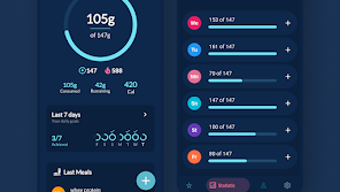
- Progress Visualization: The home screen displays a 7-day trend graph, offering a clear overview of protein consumption patterns over time.
- Offline Functionality: The app operates without an internet connection, making it suitable for use during travel, gym sessions, or in areas with limited connectivity.
- Customizable Profile Settings: Users can adjust their weight, protein goals, and unit preferences (kilograms or pounds), enabling flexibility across different user needs.
- User Feedback Integration: A built-in option allows users to submit reviews and suggestions, supporting continuous development and responsiveness to user needs.
These features collectively support consistent dietary tracking, reduce user friction, and promote long-term engagement. The meal card system enhances usability by enabling rapid meal repetition and correction, ideal for users with regular eating patterns. The visual progress tracker helps users identify trends and stay motivated, while offline access ensures uninterrupted use in dynamic environments.
User Interface, Workflow & Performance
Protein Tracker features a clean, minimalistic interface optimized for ease of use on mobile devices. The home screen centers around the user’s current protein status, displaying the daily goal, consumed amount, and remaining target. This layout prioritizes immediate visibility of progress, allowing users to make informed decisions throughout the day.
Navigating through the app is straightforward, with intuitive gestures such as swiping to manage meal cards. The workflow is designed to minimize steps—entering protein grams and optionally naming the food takes seconds. This efficiency supports consistent logging, which is critical for accurate tracking over time.
The developer did not specify resource usage details, including CPU or RAM consumption. Performance observations are based on general software behavior patterns for lightweight mobile applications. Stability is expected to be consistent given the app’s limited scope and lack of complex background processes. No performance issues were reported in the provided information, and the offline capability suggests a lightweight architecture.
Compatibility & System Requirements
Protein Tracker is designed for Android devices, with version 1.0 released on March 15, 2024. The installation size is 12.5 MB, indicating a lightweight footprint suitable for most Android smartphones and tablets. The developer did not provide additional system requirements, such as minimum Android version or hardware specifications.
Platform compatibility information is limited to Android, and no details were provided regarding support for other operating systems. The app’s size and functionality suggest it is compatible with a wide range of devices, including entry-level smartphones. Users should ensure their device meets basic Android system requirements to run the application.
Pros and Cons
Pros
- Free to download and use with no in-app purchases
- Simple, intuitive interface ideal for beginners
- Offline functionality enables use without internet
- Automated protein goal calculation based on weight
- Swipe-based meal card management for quick edits
- Visual 7-day progress tracking for motivation
- Customizable profile settings including units and goals
Cons
- No information on compatibility with iOS or other platforms
- Exact system requirements were not listed
- Only tracks protein intake—no broader nutritional data
- Basic feature set may not suit advanced users
- Limited to Android OS only
FAQ Section
Is Protein Tracker available for iOS devices?
The app is currently only available for Android. No information is provided about future iOS support.
Does Protein Tracker require an internet connection?
No, the app functions entirely offline, allowing users to log protein intake without internet access.
Can I change my protein goal after setting it?
Yes, users can adjust their daily protein goal through the profile settings at any time.
Is the app secure and private?
The developer did not provide specific details about data privacy or security measures. However, since the app operates offline, user data remains on the device unless explicitly shared.
How often are updates released?
The release date of version 1.0 was March 15, 2024. No information is available about the update frequency or future release plans.
Final Thoughts
Protein Tracker offers a focused, no-frills solution for individuals dedicated to tracking their daily protein intake. Its automated goal calculation, swipe-based meal management, and offline functionality make it a practical tool for fitness enthusiasts and health-conscious users. The app’s simplicity and free access lower the barrier to entry, while its customizable settings accommodate different user preferences.
While the app is limited in scope—centered solely on protein tracking—it excels in its niche. It is particularly well-suited for beginners or those who prefer a minimalistic approach to diet tracking. For users seeking a dedicated, reliable tool to support muscle-building or healthy eating goals, Protein Tracker delivers a streamlined experience without unnecessary complexity.
Download Protein Tracker now







